How to share articles from GoogleReader to Twitter
When reading articles in GoogleReader, how to share the nice articles to Twitter at a rapid? I made one GreaseMonkey script for that, and you can now.
The format of messages
[Tag] Title(Note) URL
The basic function
The installation order
The specification
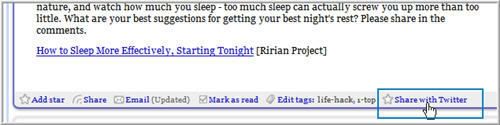
1. the link "Share with twitter"
After installing the script, open GoogleReader. Below each article, one link "Share with twitter" is added in the toolbar.
2. one mini window
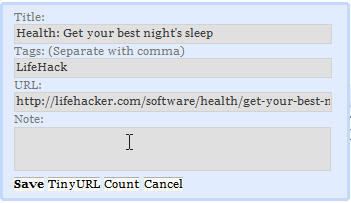
Click the link, one mini window will popup. There are four inputboxes: Title, Tags, URL, and Note. Tag\title\URL are received from articles in GoogleReader automatically. And you can edit them. If you want to talk about it yourself, please input in "Note".
3. four buttons
4. the user authentication
When you send the first message, one authentication is required. Please use your registered username or email address as the username component.
5. show the messages shared

You can install the script here:
http://userscripts.org/scripts/show/10169
The format of messages
[Tag] Title(Note) URL
The basic function
- Tag\title\URL are received from articles in GoogleReader automatically. And you can edit them.
- URL can be converted into tinyURL.
- Before sending the messages, the words number will be counted.
The installation order
i. Install the browser - firefox
http://www.mozilla.com/en-US/
ii. Install the plugin - GreaseMonkey
http://addons.mozilla.org/en-US/firefox/addon/748
iii. Install this script
http://userscripts.org/scripts/show/10169
The specification
1. the link "Share with twitter"
After installing the script, open GoogleReader. Below each article, one link "Share with twitter" is added in the toolbar.
2. one mini window
Click the link, one mini window will popup. There are four inputboxes: Title, Tags, URL, and Note. Tag\title\URL are received from articles in GoogleReader automatically. And you can edit them. If you want to talk about it yourself, please input in "Note".
3. four buttons
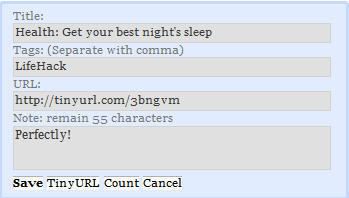
- Save - send the message to twitter
- TinyURL - make the long url tiny. Once you click it, please wait the URL changing from "making urlurl tiny..." to one tiny url
- Count - count the words' number
- Cancel - close the mini windows
4. the user authentication
When you send the first message, one authentication is required. Please use your registered username or email address as the username component.
5. show the messages shared
You can install the script here:
http://userscripts.org/scripts/show/10169
posted by terababy @ 6/24/2007




15 Comments:
At 10:15 pm , Anonymous said...
Nice plugin. I added it to the list @ http://wtips.blogspot.com/2007/04/twitter-tools.html
At 3:31 am , Anonymous said...
installed the script via greasekit for safari, and was full of hopes, as the previous three greasemonkey scripts i installed in that fashion all worked. sadly, this one did not. too bad as i would have loved to add to twitter from google reader in safari.
At 3:04 am , Anonymous said...
Great stuff!
Follow me @ http://twitter.com/chrischerrett
At 2:56 am , Anonymous said...
great plugin, i added this to our Twitter catalog and invoke this article, http://twitrapps.blog.com. Please notify us (twitter.com/twitrapps), if you have new Twitter applications. Thanks.
At 5:50 am , bestiality porn stories said...
And finally, just when she thought she could stand no more of such intense pleasure, he gave up her swollen, throbbing breasts. and eventually the erect penis, through gentle thrusting and truelove for your partner cause you to ejaculate sperm into her uteruswhere just one of their wriggling, minuscule cells is soaked up by theegg and begins a new, human life.
steamy lesbian stories
bondage slave stories
black sex stories
alt sex stories post
spanking caning punishment stories
And finally, just when she thought she could stand no more of such intense pleasure, he gave up her swollen, throbbing breasts. and eventually the erect penis, through gentle thrusting and truelove for your partner cause you to ejaculate sperm into her uteruswhere just one of their wriggling, minuscule cells is soaked up by theegg and begins a new, human life.
At 4:10 pm , Anonymous said...
locksmith miami beach fl
locksmith miami beach
Memphis Locksmith
Memphis Locksmith
Washington DC Locksmith
Locksmith Washington
Memphis Locksmith
Memphis Locksmith
Locksmith Corona Corona Locksmiths
Locksmith Corona CA
Locksmith Corona CA
Locksmith Corona
Hampton Locksmith
Locksmith Hampton VA
Carrollton TX Locksmith
Dallas Locksmith
Miami Locksmith
Miami Locksmith
Miami Locksmith
Miami Locksmith
Miami Locksmith
Miami Locksmith
Miami Locksmith
Miami Locksmith
Miami Locksmith
At 6:38 am , Anonymous said...
Hiya! Quick question that's completely off topic. Do you know how to make your site mobile friendly? My web site looks weird when viewing from my apple iphone. I'm trying to
find a theme or plugin that might be able to resolve this problem.
If you have any recommendations, please share.
Appreciate it!
Stop by my web site: how to advertise on twitter
At 9:11 am , Anonymous said...
This is a good tip particularly to those new to the
blogosphere. Simple but very accurate information… Thank you for sharing this one.
A must read article!
Feel free to surf to my page: avafx9.wordpress.com
At 6:27 am , Anonymous said...
I must thank you for the efforts you have put in penning this site.
I am hoping to check out the same high-grade content by you later on as
well. In fact, your creative writing abilities has encouraged me to get my very own site now ;)
Here is my weblog; aaa fx
At 8:16 pm , Anonymous said...
Everything is very open with a very clear description of the
challenges. It was really informative. Your website is very helpful.
Thanks for sharing!
My web page :: get more followera
At 12:53 am , Anonymous said...
We are a group of volunteers and starting a new scheme in our community.
Your site offered us with valuable info to work on. You have done a formidable job and our entire community will be
thankful to you.
Feel free to surf to my homepage phonesteam74.webs.com
At 12:58 am , Anonymous said...
I simply couldn't leave your site before suggesting that I really loved the standard information an individual provide to your visitors? Is gonna be again continuously in order to check up on new posts
Also visit my weblog - voyance
At 11:49 pm , Anonymous said...
I think this is among the most significant info for me.
And i am glad reading your article. But should remark
on some general things, The web site style is ideal,
the articles is really excellent : D. Good job, cheers
My webpage ... get followers
At 1:14 am , Anonymous said...
It's remarkable for me to have a web page, which is good in favor of my know-how. thanks admin
Here is my website: quick weightloss
At 5:10 am , Anonymous said...
I seldom leave responses, but i did a few searching and wound up here "How to share articles from GoogleReader to Twitter".
And I actually do have 2 questions for you if you usually do
not mind. Is it simply me or does it seem like a few of these responses look like left by brain dead folks?
:-P And, if you are writing on additional sites, I
would like to keep up with everything fresh you have to post.
Would you list of all of your communal pages like your twitter feed, Facebook page
or linkedin profile?
Also visit my page: cccam cfg zip
Post a Comment
Subscribe to Post Comments [Atom]
<< Home